A web domain is a website: a name, its aliases, a folder of files and the server configuration that serves them. Add your first domain covers creating one; this guide covers every tab of a domain.
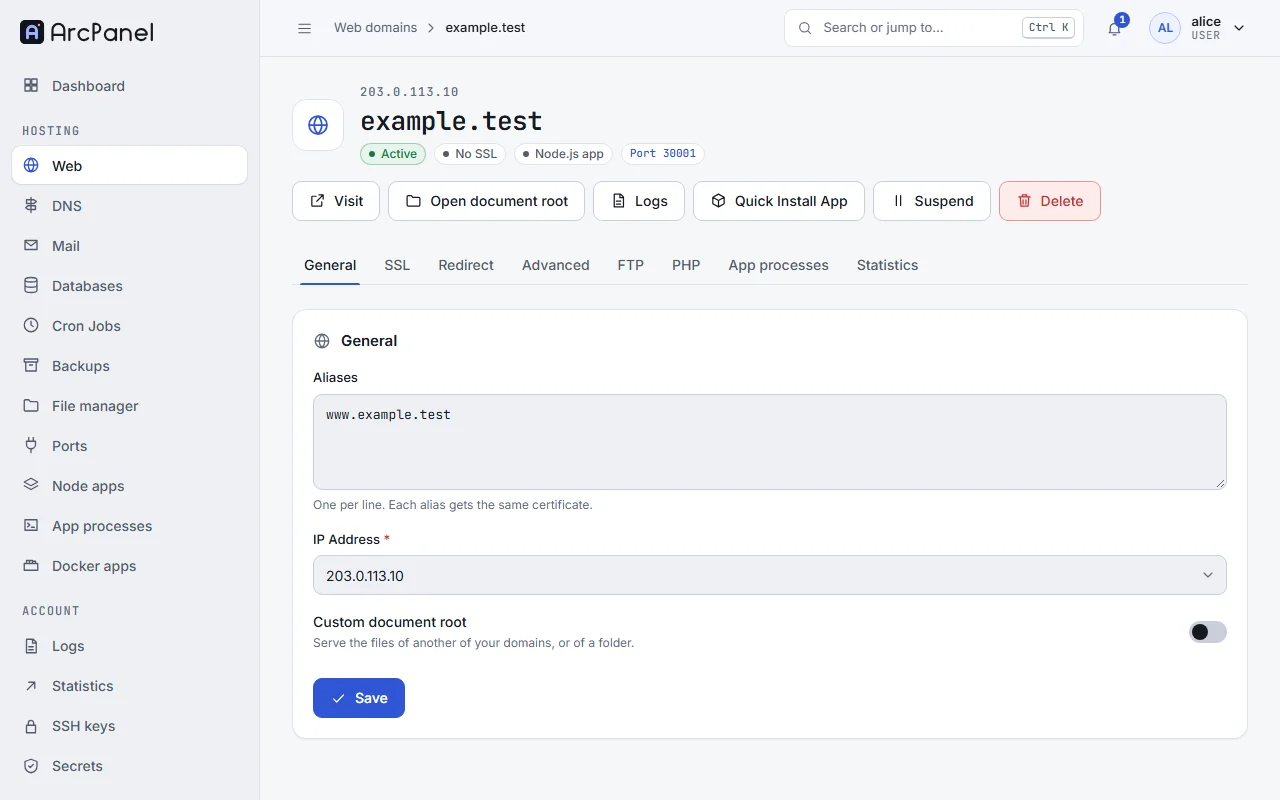
Open Web in the sidebar and click a domain to edit it. The page has the tabs General, SSL, Redirect, Advanced, FTP, PHP, App processes and Statistics, and the buttons Visit, Open document root, Logs and Quick Install App.
General
- Aliases: other names that show the same site, one per line, such as
www.example.comorshop.example.com. When the domain's DNS zone is on this server, ArcPanel adds the DNS records for new aliases, and it renews the Let's Encrypt certificate to cover them. A wildcard alias*.example.comcatches every subdomain. - IP Address: the address the site answers on, when the server has more than one.
- Custom document root: serve the files of another folder or of another of your domains, with Point to and Directory. Use it when an application wants its public folder elsewhere, for example
publicin Laravel.
Templates
Each domain has up to three templates, chosen in the template catalog on the Advanced tab:
| Template | Configures |
|---|---|
| Web Template | The web server that faces visitors (NGINX, or Apache without NGINX) |
| Proxy Template | NGINX in front of Apache, when both are installed |
| Backend Template | The PHP-FPM pool of the domain |
The catalog groups templates by kind: General, PHP CMS, PHP frameworks, E-commerce, Node.js, Python, Go, Ruby, Static, Proxy and containers and Other. There are tuned templates for WordPress, Laravel, Drupal, Joomla, Magento, PrestaShop, Moodle and others, templates for single-page apps and static sites, and proxy templates for Node.js, Django, Flask and FastAPI, Rails, Go and Docker apps. Each card says what the template is for and which runtime it needs; a template whose runtime is not installed says so.
Keep default unless your application has a template of its own. A wrong template can break a site, so change one at a time and check the site after each change.
App port
Templates that pass requests to an application (Node.js, Python, Go, Ruby, Docker) have an App port. Your application must listen on 127.0.0.1 on that port; the port is taken from your port pool. Until it is set, the site shows "This site's app is not configured yet."
Custom templates
Administrators can add their own templates: copy a shipped one in /usr/local/arcpanel/data/templates/web/ (for example nginx/php-fpm/default.tpl and default.stpl, the HTTP and HTTPS versions) to a new name in the same folder and edit it. Templates use placeholders such as %domain%, %docroot%, %user% and %ip%, which ArcPanel fills in for each domain. Give the copy a new name: shipped templates are replaced on updates.
SSL
See Issue an SSL certificate. The tab also has Key type (ECDSA P-256, ECDSA P-384 or RSA 4096) and Enable SSL HSTS, which tells browsers to use HTTPS only; turn it on only once HTTPS works everywhere on the site.
A certificate for a wildcard alias (*.example.com) is issued through DNS, so the domain's DNS zone must be on this server.
Redirect
Turn on Enable domain redirection and choose Redirect to: www.example.com, example.com or a Custom URL. Status code is 301 Moved permanently for a lasting change, or 302 Found for a temporary one.
v-add-web-domain-redirect alice example.com www.example.com 301
Advanced
Besides the templates and the App port:
- Proxy Support puts NGINX in front of Apache for the domain; Proxy Extensions lists the file types NGINX serves itself.
- Enable FastCGI Cache, on servers where NGINX runs PHP without Apache, makes NGINX keep PHP pages for Cache Duration (
30s,2m,1h,1d). It speeds up sites whose pages are the same for every visitor; do not use it for shops or sites where visitors sign in, unless the application sends the right cache headers.
PHP
- PHP version: the versions the administrator installed and your package allows. A version past its End of life gets no security fixes any more; move away from it.
- PHP-FPM profile: how many PHP processes the domain may run and how much memory each may use:
| Profile | For | Processes | Memory | Upload |
|---|---|---|---|---|
default |
As in ArcPanel 2.0 | 8 | — | — |
small |
Small sites with little traffic | 4 | 128M | 32M |
medium |
Busy sites | 20 | 512M | 128M |
large |
Large shops and applications | 50 | 1024M | 512M |
The Effective PHP limits card shows the resulting memory_limit, upload_max_filesize, post_max_size, max_execution_time and max_input_vars.
v-change-web-domain-php alice example.com 8.4 medium
Administrators install and remove PHP versions under Server › PHP, which also sets the Default PHP Version.
FTP
Additional FTP accounts gives other people FTP access to the domain, or to a folder of it. Each account has a Username, a Password and a Path inside /home/alice/web/example.com/.
Statistics
Choose a Web Statistics engine to build visitor statistics from the access log, and protect them with Statistics Authorization, a Username and a Password. Open statistics opens them at /vstats/ on the domain.
Logs
Logs shows the Access Log and the Error Log of the domain, with Wrap lines, Refresh and Download (the last 5000 lines). Check the error log first when a site shows an error page.
Quick Install App
Quick Install App installs an application into the domain's public_html: WordPress, ClassicPress, Drupal, Joomla, Concrete CMS, Grav, DokuWiki, MediaWiki, Nextcloud, Flarum, PrestaShop, OpenCart, Shopware, ThirtyBees, QloApps, Dolibarr, osTicket, Castopod, NamelessMC, Vvveb, Laravel and Symfony. Fill in the form (for WordPress: site name, administrator, e-mail, password and language) and follow the Installation log.
Warning
The installer writes into
public_html. When the folder is not empty it shows a Data Loss Warning!: back up or move the files first.
Suspend and delete
Suspend takes the site offline and shows a "suspended" page; Unsuspend brings it back. Delete removes the domain, its files, its configuration and the Node.js or Docker apps attached to it. Both ask you to confirm.
Next steps
- Node.js apps and Docker apps for sites that are not PHP.
- File manager to work with the files.