ArcPanel installs what the hosting needs and keeps it up to date. Three pages under Server handle software: System packages for runtimes and tools that apps need, PHP for PHP versions, and Updates for ArcPanel itself. All three are for administrators.
System packages
Open Updates › System packages. The page installs packages from the distribution's archive for apps and templates that need them:
| Section | Package | For |
|---|---|---|
| Runtimes | Python 3 | Python with venv, headers and pipx, for Django, Flask and FastAPI apps |
| Go | The Go compiler and tools, for Go apps | |
| Ruby | Ruby with headers and Bundler, for Rails and other Rack apps | |
| Media | FFmpeg | Audio and video conversion |
| ImageMagick | Image conversion (convert, identify); installed with ArcPanel |
|
| Tools | Build tools | Compilers, make and pkg-config, for native Python wheels, gems and Node.js modules |
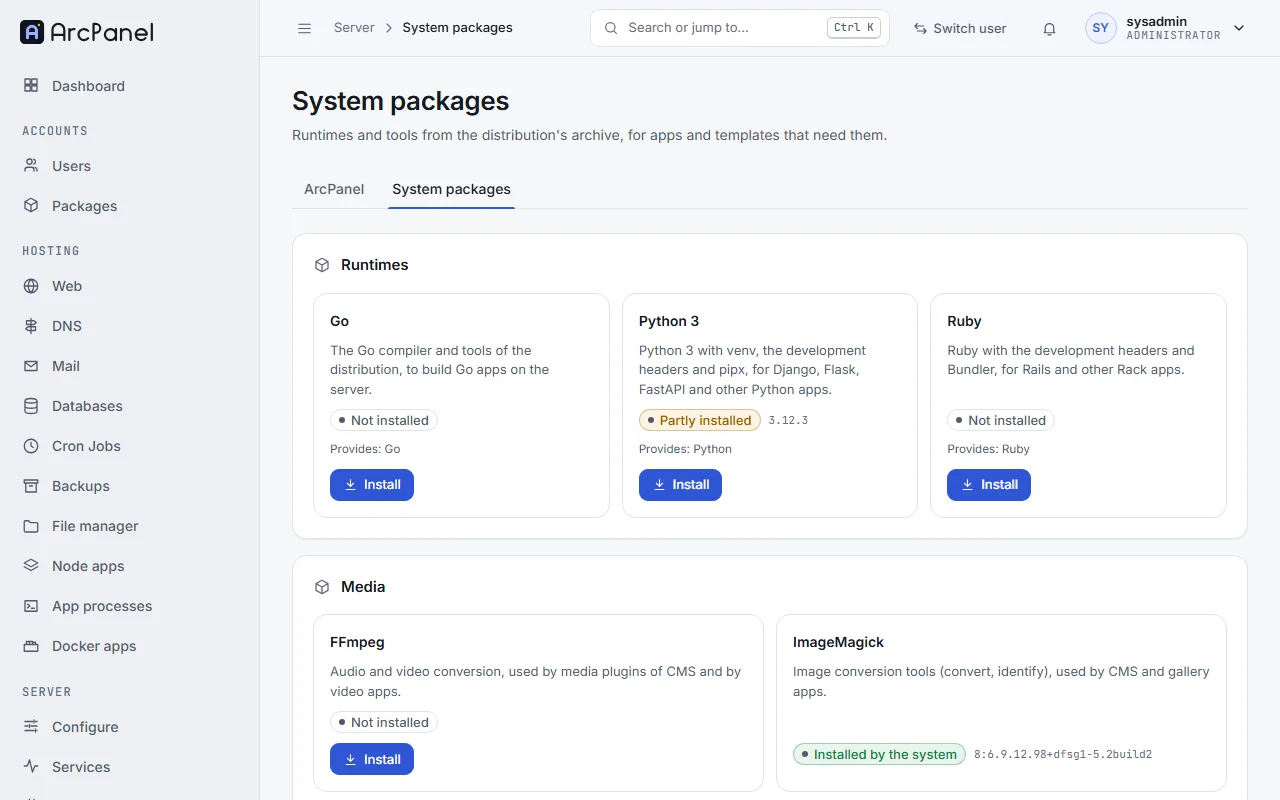
Each package shows whether it is Installed, Not installed, Partly installed or Installed by the system, what it Provides, and how many web domains use it. Install and Remove run in the background with their output on the page, one task at a time.
Remove is offered only for packages ArcPanel installed, and is disabled while web domains need them. It removes the packages without their dependencies, and keeps anything that was installed before.
The templates and presets that need a runtime say so: the app process presets for Gunicorn or Puma, for example, show "Ruby with bundler is not installed (add it on the System packages page)" until you install it.
v-add-sys-package python
v-delete-sys-package python
PHP versions
Open PHP under Server. The page lists the installed PHP versions with their Support state (Active support, Security fixes only or End of life), how many web domains use each, and their extensions.
- Install adds a version, with the common extensions. ArcPanel offers PHP 7.4 to 8.5; versions past their end of life are hidden unless one is installed, and installing one shows a warning.
- Remove deletes a version with its extensions. A version that web domains use, or the default version, cannot be removed.
- Default PHP Version is the version of the
phpcommand and of web domains on the default backend template.
Open a version for its tabs Overview, Extensions, php.ini (PHP-FPM) and php.ini (command line):
- Extensions installs and removes extensions of that version.
- The
php.initabs change common settings in a form, or the whole file with Edit file. Validate checks the file first. Each save keeps a backup, the last ten can be restored under Backups, and the old file comes back by itself when PHP-FPM does not start with the new one.
PHP-FPM profiles sets the process manager and the limits of the profiles that web domains choose: Process manager, Maximum processes, Memory limit, upload and POST sizes, execution time and others. ArcPanel ships default, small, medium and large (Web domains and templates shows their values). Packages choose which profiles their users may use.
v-add-web-php 8.4
v-change-sys-php 8.4
v-list-sys-php
Updates of ArcPanel
Open Updates › ArcPanel. The page lists the packages of the panel (arcpanel, arcpanel-nginx, arcpanel-php) with their Version and whether an update is available.
- Update installs the update of one package.
- Update all installs every update. The panel restarts during the update, so the page reloads.
Automatic updates
The installer turns automatic updates on. Each night, at a time chosen at random between 01:00 and 06:59, the server installs the new patch releases of its release line, for example 2.2.4 on a 2.2 server. It does not move to a new release line by itself: when 2.3 is out, the administrator gets a notification, and an e-mail if notifications are on, and upgrades when ready.
Disable Automatic Updates and Enable Automatic Updates on the page turn it off and on. Under Notifications, Send email notification when an update has been installed and Send update installation log by email choose what the administrator gets.
v-list-sys-arcpanel-updates
v-update-sys-arcpanel-all
v-add-cron-arcpanel-autoupdate apt
v-delete-cron-arcpanel-autoupdate
The log of automatic updates is /var/log/arcpanel/autoupdate.log.
Operating system updates
ArcPanel updates its own packages only. Keep the operating system up to date with apt or unattended upgrades, as on any server; the packages of ArcPanel come from apt.arcpanel.org, so apt upgrade updates them too.
sudo apt update && sudo apt upgrade
Next steps
- Server settings for the other server-wide options.
- App processes, which use the runtimes above.